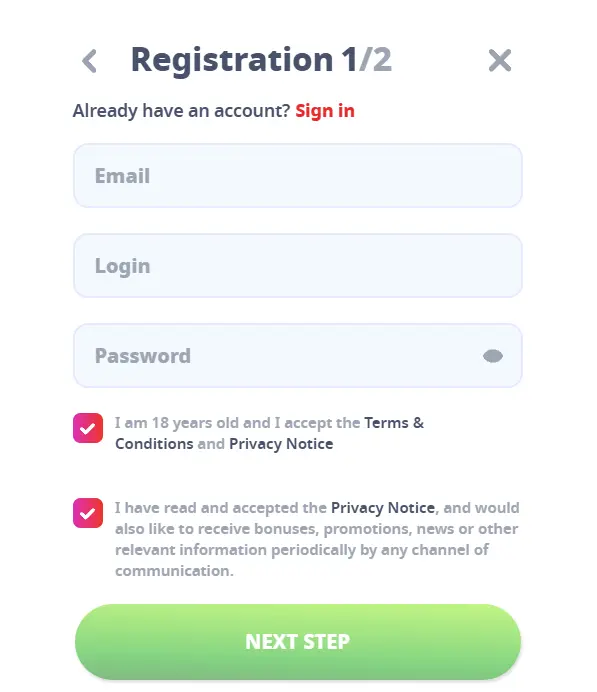
Creating an account at Casino Infinity is simple and hassle-free. To get started, visit our official website and locate the "Register" button in the top-right corner of the homepage. Click it to begin the registration process:
1. First, enter your details, including your email address, username, and enter a strong password.
2. Now put your personal details - first & last name, date of brith, phone no. and address.
Be sure to enter accurate and valid information during registration, as this will be required later for verifying your account and identity. This ensures a secure and responsible gaming experience. If you need assistance at any point, our friendly customer support team is available 24/7 to help you.
Before withdrawal you need to verify your identity, for that you will be required to upload your ID card, both front and back along with your debit or credit card, you may hide the mid 4 digits for privacy, rest assured your privacy is in safe hands!
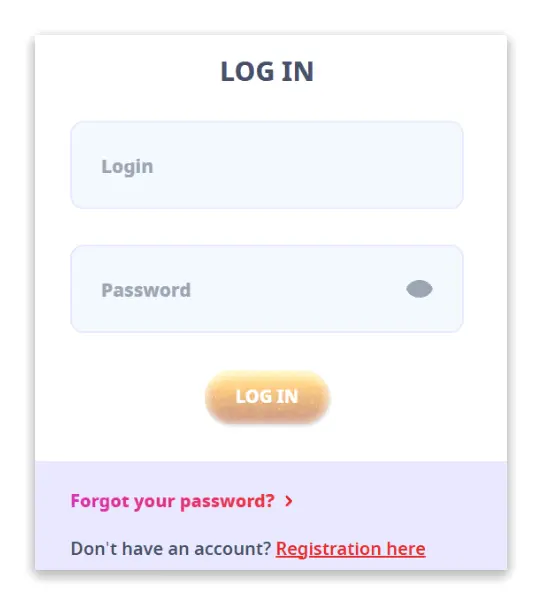
If your session expires or you’re signed out after registration, don’t worry – logging back into your Casino Infinity account is even quicker and simpler than signing up. Follow these straightforward steps to get back into your account:
1. Visit the official Casino Infinity website and locate the "Login" button in the top-right corner of the homepage. Click the button to proceed.
2. Once you click that you will see a login popup that will look something like this.
3. Enter your email and password in the designated fields, then click the "Login" button to access your account.
4. If you’ve forgotten your username or password, don’t stress. Use the "Forgot your password" option on the login window to reset your credentials.
5. Haven’t created an account yet? You can also sign up directly from this screen.
For those who prefer to explore the platform before playing with real money, Casino Infinity offers a "Demo" mode. Simply select the game you want to play and start in demo.
Depositing funds into your Casino Infinity account is simple and secure. Follow these steps to start playing your favorite casino games:
1. Visit the official Casino Infinity website and log in to your account. Once redirected to the lobby, click on the profile icon, then click on the 'personal info’ button.
2. Navigate to the Deposit section and select your preferred payment method from the available options.
3. Enter your payment account details, specify the deposit amount, and choose your currency.
4. Click on the ‘Deposit to Account’ button to finalize your transaction.
5. If you encounter any issues or have questions, our customer support team is available to assist you via live chat. Just click the ‘Live Chat’ button in the horizontal menu for immediate help. Start depositing today and enjoy seamless gaming at Casino Infinity!
1. Visit the Casino Infinity website and log in using your username and password
2. Once logged in, click on the Profile Icon located at the top of the homepage
3. Click on the Profile info in the menu options to access your account's financial tools
4. In the Cashier section, find and click the Withdrawal option
5. Input the amount you wish to withdraw. Ensure it adheres to the casino's minimum and maximum withdrawal limits
6. Select your preferred withdrawal method from the available options (e.g., bank transfer, e-wallet, cryptocurrency
7. After verifying the details, click the Withdraw button to submit your request
NOTE: Before processing your withdrawal, you will be required to complete an identity verification process. This may include providing documents like a valid ID, proof of address, or payment verification
Withdrawal processing can take anywhere from 0-3 days, depending on the selected payment method
1. Log in to your account and go to the Promotions Section located in the casino lobby, browse through the various ongoing promotions and bonus codes available
2. Select the promotion you’re interested in and copy the provided bonus code.
3. Navigate to your Profile by clicking on your profile icon > Go to the Cashier section > Click on the Claim a Bonus option. > Enter the bonus code in the provided field.
4. Click the Claim button to activate your bonus
NOTE: Some bonuses may have specific game restrictions or expiration dates, so redeem them in time
Click the Sign Up button, fill in your details, create a secure password, and confirm your email to activate your account.
You can use the password recovery function. In order to do this, you need to click the “Log in” button and then “Forgot password?”. Enter the email address you provided us during your registration and click “Reset password”. We will send you an email containing a link to reset your login details. Click on the link and enter your password twice in the newly opened window. Click “Save changes” to save your new login details.
We are very sorry that you have made the decision to close your account. In order to deactivate your account, we ask you to contact our support service via email at support@casinoinfinity.com or our Live Chat service.
Go to the Cashier section, select your preferred payment method, enter the deposit amount, and confirm the transaction. Deposits are usually processed instantly.
Withdrawals may be pending due to account verification, wagering requirements, or processing times. Ensure all requested documents are submitted for a smooth withdrawal process.